Auto-Switch to Freeze Staff and Return to Town
Configure L2M Auto Key to automatically equip a Freeze Staff when under attack and low on HP — freeze enemies while teleporting to town, then swap back to your main weapon ready to farm again.
What is the “Weapon Switch” tab?
The Weapon Switch tab lets you configure automated actions triggered by HP conditions — weapon swaps, skill combos — completely independent of the Main tab and Radar tab. One of its most practical uses is automatically equipping a Freeze Staff to root pursuers while your character is escaping to town.
Configuring the staff swap & freeze
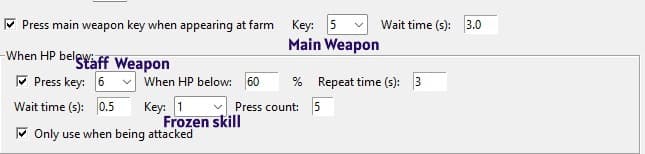
- HP trigger threshold — set the HP% below which (combined with being under attack) the tool begins the weapon-swap sequence.
- Press the staff-swap key (in-game) — the tool presses whichever key you have bound in-game to switch to the Freeze Staff slot, with a 3-second interval between attempts.
- Wait 0.5 seconds — after pressing the swap key, the tool pauses 0.5 s to let the game finish the weapon-swap animation before pressing the next skill.
- Press the freeze skill key (in-game) 5 times in a row — the tool spams the freeze skill 5 times consecutively to maximize the chance of frzone when being attacked.
- Only activates when under attack — the sequence above does not run during normal farming; it only fires when the system detects the character is being attacked.
Combined with the Main tab – teleport to town simultaneously
In the Main tab, configure the town teleport key (in-game). When conditions are met, the tool runs both actions in parallel:
- Repeatedly press the teleport key to ensure the command registers even if interrupted by incoming attacks.
- Swap to staff and spam freeze (as configured above) to root pursuers during the teleport cast time.
Switch back to main weapon after arriving in town
After a successful return to town the character is still holding the Freeze Staff. Enable the “Switch back to main weapon after returning to town” option in the Weapon Switch tab — the tool will automatically press the main weapon key as soon as it detects the character is standing in town, ready to head back to the farm zone without any manual input.
Quick Q&A
Does the staff-switch trigger when I'm not under attack?
No. The feature only activates when the character is actively being attacked, so it won't swap weapons unnecessarily during normal farming.
What if I'm under attack but my HP is still above the threshold?
Both conditions must be true at the same time: under attack AND HP below the configured threshold. Being attacked alone won't trigger the swap if HP is still high.
Do I need to manually re-equip my main weapon after returning to town?
No. Just enable "Switch back to main weapon after returning to town" in the Weapon Switch tab and the tool will swap automatically as soon as it detects the character is back in town.
Is a 3-second interval too slow?
3 seconds is a safe interval to let the game finish the weapon-swap animation before the next attempt. After swapping, the tool waits an additional 0.5 seconds before pressing the freeze skill.
Community & Support
For detailed guides, bug reports, and community discussions: Discord Channel,Facebook Fanpage
Auto-switching to a Freeze Staff while teleporting dramatically improves your escape rate when ganked — especially effective in high-PvP farm zones. Combined with continuous teleport presses, your survival odds go up noticeably. ⚔️❄️
— The Auto Key L2M Development Team